> ## Documentation Index
> Fetch the complete documentation index at: https://comfyuiwiki.com/llms.txt
> Use this file to discover all available pages before exploring further.
# Krea-2 ComfyUI ワークフロー例
> Krea 2は、高い美的品質とスタイルの多様性を実現するテキストから画像へのモデルで、RAW(ベース)とTurbo(蒸留)の2種類のバリアントがあります。
**Krea 2** は、[Krea AI](https://www.krea.ai) がゼロから学習した画像生成モデルで、クリエイティブでスタイルの探求に重点を置いています。
Krea 2は、連携して動作するように設計された2つのモデルとして提供されます:**LoRAの学習はRAWで行い、推論はTurboで実行します**:
* **Krea 2 RAW**:フルステップサンプリング(52ステップ)のベースモデル。蒸留なしで多様性が高く柔軟性に富み、ファインチューニングやLoRAトレーニングに最適です。
* **Krea 2 Turbo**:8ステップの蒸留チェックポイントで、高速かつ高品質な生成を実現。RAWで学習したLoRAをシームレスにTurboに適用できます。
**ライセンス**: [Krea AI Community License](https://www.krea.ai/krea-2-licensing)
## ローンチイベントを見る
Krea 2について、その開発ストーリー、機能、オープンソースエコシステムへの意味などを詳しく知りたい方は、上記のローンチイベントの録画をご覧ください(Victor Perez、Miguel Lara、ComfyAnonymousが出演)。
## 利用可能なモデルウェイト
Krea 2には2つのバリアントがあります:
* **Krea 2 RAW**:フルステップサンプリング(52ステップ)のベースモデル。多様性と柔軟性のために設計されており、ファインチューニングやLoRAトレーニングに最適です。
* **Krea 2 Turbo**:8ステップの蒸留チェックポイントで、高速かつ高品質な生成を実現。RAWで学習したLoRAをシームレスにTurboに適用できます。
**関連リンク**:
* [Krea 2 on Hugging Face (RAW)](https://huggingface.co/krea/Krea-2-Raw)
* [Krea 2 on Hugging Face (Turbo)](https://huggingface.co/krea/Krea-2-Turbo)
* [Comfy-Org/Krea-2 (ComfyUI モデル)](https://huggingface.co/Comfy-Org/Krea-2)
* [公式GitHubリポジトリ](https://github.com/krea-ai/krea-2)
* [テクニカルレポート](https://www.krea.ai/blog/krea-2-technical-report)
## Krea-2 Turbo テキストから画像へのワークフロー
 Comfy Cloud で開く
JSON をダウンロードするか、テンプレートライブラリで "Krea-2" を検索
ComfyUI が最新版に更新されていることを確認してください。
* [ComfyUI のダウンロード](https://www.comfy.org/download)
* [更新手順](/ja/installation/update_comfyui)
このガイドで紹介するワークフローは、[ワークフローテンプレート](/ja/interface/features/template)から入手できます。
テンプレート内に該当のワークフローが見つからない場合、ComfyUI のバージョンが古くなっている可能性があります。
ワークフローを読み込んだ際にノードが欠落している場合の主な原因:
1. 最新の ComfyUI(Nightly 版)を使用していない
2. 起動時に一部のノードのインポートに失敗している
* [Cloud](https://cloud.comfy.org) は、ComfyUI の安定版リリース後に更新されます。
したがって、このドキュメントで記載されているコアノードのうち、一部が利用できない場合は、そのノード機能がまだ最新の安定版に含まれていないためです。次回の安定版リリースをお待ちください。
ワークフローは以下の部分で構成されています:
1. **Text to Image (Krea-2 Turbo) サブグラフ**:モデル読み込み、プロンプト処理、サンプリング、VAEデコードを含むコア生成パイプライン
2. **ResolutionSelector**:希望する出力解像度を選択します。Krea 2は1Kから2Kまでの出力をサポートしており、メガピクセル値を2.0に設定すると2K解像度が得られます。
3. **CustomCombo (LoRAセレクター)**:利用可能なスタイルLoRA用のトリガーワードセレクターがあらかじめ組み込まれています。追加のLoRAをダウンロードした場合、このセレクターをカスタマイズし、対応するLoRAファイルと組み合わせて使用できます。
4. **SaveImage**:生成された画像を保存します。
このワークフローはサブグラフノードを使用してモジュール化されています。サブグラフのドキュメントを確認して、ワークフローをカスタマイズおよび拡張する方法を学びましょう。
### ワンクリック生成
最もシンプルな使い方:サブグラフにテキストプロンプトを入力し、解像度を選択して、**キューのプロンプト** をクリックします。デフォルト設定(8ステップ、プロンプトエンハンス有効、LoRAなし)で、最小限の設定で高品質な画像が生成されます。
### ワークフローコントロール
**Text to Image (Krea-2 Turbo)** サブグラフでは以下のコントロールが使用できます:
| コントロール | 説明 |
| --------------------------- | ---------------------------- |
| **Text String (ユーザープロンプト)** | 生成したい画像を記述したテキストプロンプト |
| **prompt\_enhance** | LLMによるプロンプト拡張のオン/オフを切り替え |
| **LLM\_max\_token** | プロンプト拡張の最大トークン長 |
| **Width / Height** | 出力解像度(ResolutionSelectorで制御) |
| **Seed** | 再現性のためのランダムシード |
| **enable\_lora?** | スタイルLoRAの有効/無効を切り替え |
| **LoRA Strength** | 適用するスタイルLoRAの強度 |
| **LoRA Trigger Word** | 選択したLoRAのトリガーワード(自動入力) |
### スタイルLoRA
Krea 2向けのスタイルLoRAコレクションもKreaから公開されています。**CustomCombo** ノードで1つ選択し、サブグラフ内の `enable_lora?` を有効にしてスタイルを適用します:
| LoRA | トリガーワード | 推奨強度 | ダウンロード |
| --------------------- | ----------------------------- | :--: | ----------------------------------------------------------------------------------------------------- |
| krea2\_darkbrush | monochrome ink wash style | 1.0 | [ダウンロード](https://huggingface.co/Comfy-Org/Krea-2/resolve/main/loras/krea2_darkbrush.safetensors) |
| krea2\_dotmatrix | monochrome stippling style | 1.0 | [ダウンロード](https://huggingface.co/Comfy-Org/Krea-2/resolve/main/loras/krea2_dotmatrix.safetensors) |
| krea2\_kidsdrawing | naive expressive sketch style | 1.0 | [ダウンロード](https://huggingface.co/Comfy-Org/Krea-2/resolve/main/loras/krea2_kidsdrawing.safetensors) |
| krea2\_neondrip | textured abstract style | 1.0 | [ダウンロード](https://huggingface.co/Comfy-Org/Krea-2/resolve/main/loras/krea2_neondrip.safetensors) |
| krea2\_rainywindow | rainy window style | 1.0 | [ダウンロード](https://huggingface.co/Comfy-Org/Krea-2/resolve/main/loras/krea2_rainywindow.safetensors) |
| krea2\_retroanime | purple retro anime style | 1.0 | [ダウンロード](https://huggingface.co/Comfy-Org/Krea-2/resolve/main/loras/krea2_retroanime.safetensors) |
| krea2\_softwatercolor | art deco watercolor style | 1.0 | [ダウンロード](https://huggingface.co/Comfy-Org/Krea-2/resolve/main/loras/krea2_softwatercolor.safetensors) |
| krea2\_sunsetblur | ethereal motion blur style | 1.0 | [ダウンロード](https://huggingface.co/Comfy-Org/Krea-2/resolve/main/loras/krea2_sunsetblur.safetensors) |
| krea2\_vintagetarot | vintage tarot style | 1.0 | [ダウンロード](https://huggingface.co/Comfy-Org/Krea-2/resolve/main/loras/krea2_vintagetarot.safetensors) |
`.safetensors` ファイルを `ComfyUI/models/loras/` に配置します。
### モデルのダウンロード
ローカルで使用するには、[Comfy-Org/Krea-2](https://huggingface.co/Comfy-Org/Krea-2) から ComfyUI 最適化モデルファイルをダウンロードしてください。
krea2\_turbo\_fp8\_scaled.safetensors:Turbo FP8(ほとんどのユーザーにおすすめ)
qwen3vl\_4b\_fp8\_scaled.safetensors:Qwen3VL-4B テキストエンコーダー
qwen\_image\_vae.safetensors
Hugging Face ですべてのスタイルLoRAを見る
他のモデルバリアント(BF16、NVFP4、MXFP8)も、より高性能なハードウェアをお持ちのユーザー向けに利用可能です。
#### モデル保存場所
```
📂 ComfyUI/
├── 📂 models/
│ ├── 📂 diffusion_models/
│ │ └── krea2_turbo_fp8_scaled.safetensors
│ ├── 📂 text_encoders/
│ │ └── qwen3vl_4b_fp8_scaled.safetensors
│ ├── 📂 vae/
│ │ └── qwen_image_vae.safetensors
│ └── 📂 loras/
│ └── krea2_softwatercolor.safetensors (and other style LoRAs)
```
## Krea-2 Turbo スタイル参照ワークフロー
Comfy Cloud で開く
JSON をダウンロードするか、テンプレートライブラリで "Krea-2" を検索
ComfyUI が最新版に更新されていることを確認してください。
* [ComfyUI のダウンロード](https://www.comfy.org/download)
* [更新手順](/ja/installation/update_comfyui)
このガイドで紹介するワークフローは、[ワークフローテンプレート](/ja/interface/features/template)から入手できます。
テンプレート内に該当のワークフローが見つからない場合、ComfyUI のバージョンが古くなっている可能性があります。
ワークフローを読み込んだ際にノードが欠落している場合の主な原因:
1. 最新の ComfyUI(Nightly 版)を使用していない
2. 起動時に一部のノードのインポートに失敗している
* [Cloud](https://cloud.comfy.org) は、ComfyUI の安定版リリース後に更新されます。
したがって、このドキュメントで記載されているコアノードのうち、一部が利用できない場合は、そのノード機能がまだ最新の安定版に含まれていないためです。次回の安定版リリースをお待ちください。
ワークフローは以下の部分で構成されています:
1. **Text to Image (Krea-2 Turbo) サブグラフ**:モデル読み込み、プロンプト処理、サンプリング、VAEデコードを含むコア生成パイプライン
2. **ResolutionSelector**:希望する出力解像度を選択します。Krea 2は1Kから2Kまでの出力をサポートしており、メガピクセル値を2.0に設定すると2K解像度が得られます。
3. **CustomCombo (LoRAセレクター)**:利用可能なスタイルLoRA用のトリガーワードセレクターがあらかじめ組み込まれています。追加のLoRAをダウンロードした場合、このセレクターをカスタマイズし、対応するLoRAファイルと組み合わせて使用できます。
4. **SaveImage**:生成された画像を保存します。
このワークフローはサブグラフノードを使用してモジュール化されています。サブグラフのドキュメントを確認して、ワークフローをカスタマイズおよび拡張する方法を学びましょう。
### ワンクリック生成
最もシンプルな使い方:サブグラフにテキストプロンプトを入力し、解像度を選択して、**キューのプロンプト** をクリックします。デフォルト設定(8ステップ、プロンプトエンハンス有効、LoRAなし)で、最小限の設定で高品質な画像が生成されます。
### ワークフローコントロール
**Text to Image (Krea-2 Turbo)** サブグラフでは以下のコントロールが使用できます:
| コントロール | 説明 |
| --------------------------- | ---------------------------- |
| **Text String (ユーザープロンプト)** | 生成したい画像を記述したテキストプロンプト |
| **prompt\_enhance** | LLMによるプロンプト拡張のオン/オフを切り替え |
| **LLM\_max\_token** | プロンプト拡張の最大トークン長 |
| **Width / Height** | 出力解像度(ResolutionSelectorで制御) |
| **Seed** | 再現性のためのランダムシード |
| **enable\_lora?** | スタイルLoRAの有効/無効を切り替え |
| **LoRA Strength** | 適用するスタイルLoRAの強度 |
| **LoRA Trigger Word** | 選択したLoRAのトリガーワード(自動入力) |
### スタイルLoRA
Krea 2向けのスタイルLoRAコレクションもKreaから公開されています。**CustomCombo** ノードで1つ選択し、サブグラフ内の `enable_lora?` を有効にしてスタイルを適用します:
| LoRA | トリガーワード | 推奨強度 | ダウンロード |
| --------------------- | ----------------------------- | :--: | ----------------------------------------------------------------------------------------------------- |
| krea2\_darkbrush | monochrome ink wash style | 1.0 | [ダウンロード](https://huggingface.co/Comfy-Org/Krea-2/resolve/main/loras/krea2_darkbrush.safetensors) |
| krea2\_dotmatrix | monochrome stippling style | 1.0 | [ダウンロード](https://huggingface.co/Comfy-Org/Krea-2/resolve/main/loras/krea2_dotmatrix.safetensors) |
| krea2\_kidsdrawing | naive expressive sketch style | 1.0 | [ダウンロード](https://huggingface.co/Comfy-Org/Krea-2/resolve/main/loras/krea2_kidsdrawing.safetensors) |
| krea2\_neondrip | textured abstract style | 1.0 | [ダウンロード](https://huggingface.co/Comfy-Org/Krea-2/resolve/main/loras/krea2_neondrip.safetensors) |
| krea2\_rainywindow | rainy window style | 1.0 | [ダウンロード](https://huggingface.co/Comfy-Org/Krea-2/resolve/main/loras/krea2_rainywindow.safetensors) |
| krea2\_retroanime | purple retro anime style | 1.0 | [ダウンロード](https://huggingface.co/Comfy-Org/Krea-2/resolve/main/loras/krea2_retroanime.safetensors) |
| krea2\_softwatercolor | art deco watercolor style | 1.0 | [ダウンロード](https://huggingface.co/Comfy-Org/Krea-2/resolve/main/loras/krea2_softwatercolor.safetensors) |
| krea2\_sunsetblur | ethereal motion blur style | 1.0 | [ダウンロード](https://huggingface.co/Comfy-Org/Krea-2/resolve/main/loras/krea2_sunsetblur.safetensors) |
| krea2\_vintagetarot | vintage tarot style | 1.0 | [ダウンロード](https://huggingface.co/Comfy-Org/Krea-2/resolve/main/loras/krea2_vintagetarot.safetensors) |
`.safetensors` ファイルを `ComfyUI/models/loras/` に配置します。
### モデルのダウンロード
ローカルで使用するには、[Comfy-Org/Krea-2](https://huggingface.co/Comfy-Org/Krea-2) から ComfyUI 最適化モデルファイルをダウンロードしてください。
krea2\_turbo\_fp8\_scaled.safetensors:Turbo FP8(ほとんどのユーザーにおすすめ)
qwen3vl\_4b\_fp8\_scaled.safetensors:Qwen3VL-4B テキストエンコーダー
qwen\_image\_vae.safetensors
Hugging Face ですべてのスタイルLoRAを見る
他のモデルバリアント(BF16、NVFP4、MXFP8)も、より高性能なハードウェアをお持ちのユーザー向けに利用可能です。
#### モデル保存場所
```
📂 ComfyUI/
├── 📂 models/
│ ├── 📂 diffusion_models/
│ │ └── krea2_turbo_fp8_scaled.safetensors
│ ├── 📂 text_encoders/
│ │ └── qwen3vl_4b_fp8_scaled.safetensors
│ ├── 📂 vae/
│ │ └── qwen_image_vae.safetensors
│ └── 📂 loras/
│ └── krea2_softwatercolor.safetensors (and other style LoRAs)
```
## Krea-2 Turbo スタイル参照ワークフロー
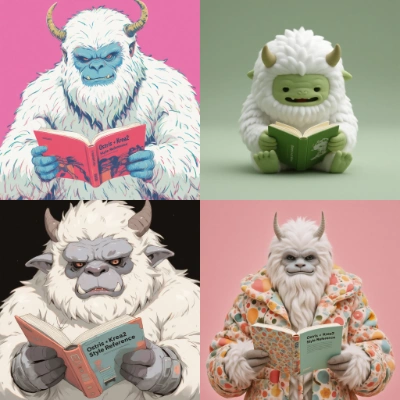 Comfy Cloud で開く
JSONをダウンロードするか、テンプレートライブラリで「Krea-2 スタイル参照」を検索してください
スタイル参照ワークフローは、Krea-2 Turbo パイプラインに参照画像の条件付けを追加したものです。1つ以上の参照画像をアップロードして、生成出力の美的スタイル、雰囲気、ビジュアルの方向性に影響を与えます。
ワークフローは以下のいくつかの部分で構成されています:
1. **画像スタイル参照(Krea-2 Turbo)サブグラフ**:スタイル参照に対応したコア生成パイプラインです。モデルの読み込み、参照画像の条件付け、プロンプト処理、サンプリングを含みます。
2. **LoadImage**:スタイル参照画像をアップロードします。
3. **ResolutionSelector**:希望する出力解像度を選択します。Krea 2 は 1K から 2K までの出力をサポートします。
4. **SaveImage**:生成画像を保存します。
### スタイル参照の使用方法
1. **参照画像をアップロードする** — LoadImageノードを使用して、1つ以上のスタイル参照画像を読み込みます。
2. **プロンプトを入力する** — サブグラフのユーザープロンプト入力欄にテキスト説明を入力します。
3. **モデルバリアントを選択する** — サブグラフのモデルセレクターでモデルチェックポイントを選択します。
4. **設定を調整する** — 解像度、シードを設定し、必要に応じてプロンプト拡張を有効にします。
5. **キューをクリックする** — `Ctrl+Enter` を押して生成します。
このスタイル参照ワークフローは、専用の拡散モデルとLoRAを使用します。テキストエンコーダーとVAEはテキストから画像へのワークフローと共有されます。
krea2\_turbo\_int8\_convrot.safetensors
qwen3vl\_4b\_fp8\_scaled.safetensors:Qwen3VL-4B テキストエンコーダー
qwen\_image\_vae.safetensors
krea2\_style\_reference.safetensors
ファイルを以下のディレクトリに配置してください:
```
📂 ComfyUI/
├── 📂 models/
│ ├── 📂 diffusion_models/
│ │ └── krea2_turbo_int8_convrot.safetensors
│ ├── 📂 text_encoders/
│ │ └── qwen3vl_4b_fp8_scaled.safetensors
│ ├── 📂 vae/
│ │ └── qwen_image_vae.safetensors
│ └── 📂 loras/
│ └── krea2_style_reference.safetensors
```
Comfy Cloud で開く
JSONをダウンロードするか、テンプレートライブラリで「Krea-2 スタイル参照」を検索してください
スタイル参照ワークフローは、Krea-2 Turbo パイプラインに参照画像の条件付けを追加したものです。1つ以上の参照画像をアップロードして、生成出力の美的スタイル、雰囲気、ビジュアルの方向性に影響を与えます。
ワークフローは以下のいくつかの部分で構成されています:
1. **画像スタイル参照(Krea-2 Turbo)サブグラフ**:スタイル参照に対応したコア生成パイプラインです。モデルの読み込み、参照画像の条件付け、プロンプト処理、サンプリングを含みます。
2. **LoadImage**:スタイル参照画像をアップロードします。
3. **ResolutionSelector**:希望する出力解像度を選択します。Krea 2 は 1K から 2K までの出力をサポートします。
4. **SaveImage**:生成画像を保存します。
### スタイル参照の使用方法
1. **参照画像をアップロードする** — LoadImageノードを使用して、1つ以上のスタイル参照画像を読み込みます。
2. **プロンプトを入力する** — サブグラフのユーザープロンプト入力欄にテキスト説明を入力します。
3. **モデルバリアントを選択する** — サブグラフのモデルセレクターでモデルチェックポイントを選択します。
4. **設定を調整する** — 解像度、シードを設定し、必要に応じてプロンプト拡張を有効にします。
5. **キューをクリックする** — `Ctrl+Enter` を押して生成します。
このスタイル参照ワークフローは、専用の拡散モデルとLoRAを使用します。テキストエンコーダーとVAEはテキストから画像へのワークフローと共有されます。
krea2\_turbo\_int8\_convrot.safetensors
qwen3vl\_4b\_fp8\_scaled.safetensors:Qwen3VL-4B テキストエンコーダー
qwen\_image\_vae.safetensors
krea2\_style\_reference.safetensors
ファイルを以下のディレクトリに配置してください:
```
📂 ComfyUI/
├── 📂 models/
│ ├── 📂 diffusion_models/
│ │ └── krea2_turbo_int8_convrot.safetensors
│ ├── 📂 text_encoders/
│ │ └── qwen3vl_4b_fp8_scaled.safetensors
│ ├── 📂 vae/
│ │ └── qwen_image_vae.safetensors
│ └── 📂 loras/
│ └── krea2_style_reference.safetensors
```