

- Runway Gen4 turbo
What Runway Video Generation is good at
- Image-to-video generation: The
Runway Gen4 turbonode generates a video from an input image and a text prompt describing the video content - Adjustable video length: Modify the
durationparameter to set the video length - Adjustable aspect ratio: Modify the
ratioparameter to set the video aspect ratio
Retired workflows and replacements
Gen4 turbo Image-to-Video Workflow
1. Workflow File Download
The video below contains workflow information in itsmetadata. Please download and drag it into ComfyUI to load the corresponding workflow.
Download Json Format Workflow File
Download the image below as input image
2. Complete the Workflow Execution Step by Step
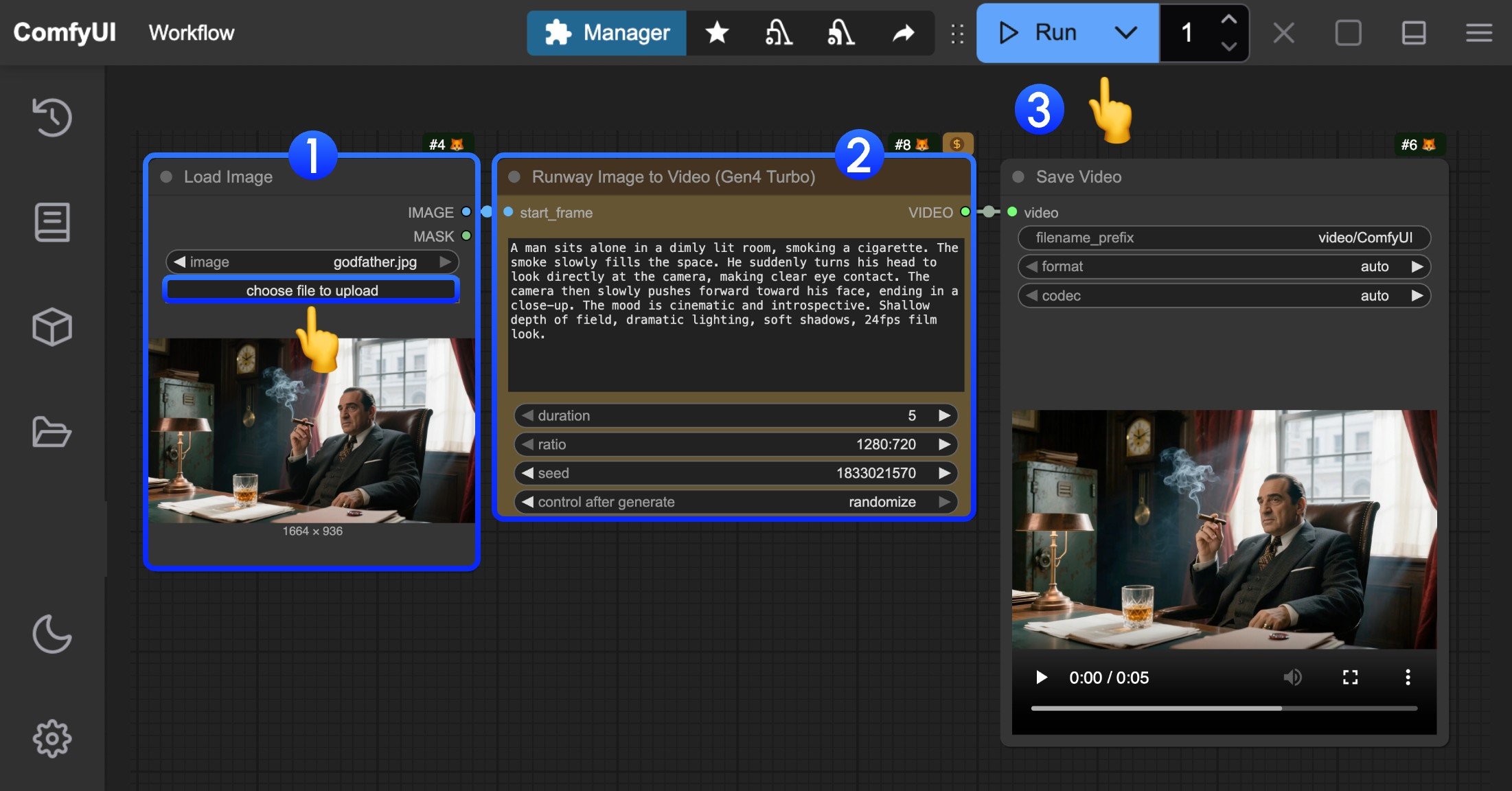
- In the
Load Imagenode, load the provided input image - In the
Runway Gen4 turbonode, set thepromptto describe video content, modify thedurationparameter to set video length, modify theratioparameter to set video aspect ratio - Click the
Runbutton, or use the shortcutCtrl(cmd) + Enterto execute video generation. - After waiting for the API to return results, you can view the generated video in the
Save Videonode (right-click to save). The corresponding video will also be saved to theComfyUI/output/directory.